
Location Intelligence
Know the area, not just the address.
Useful context needs more than a pin. Kora connects the property to nearby places and available market information—without pretending every dataset describes the same boundary.
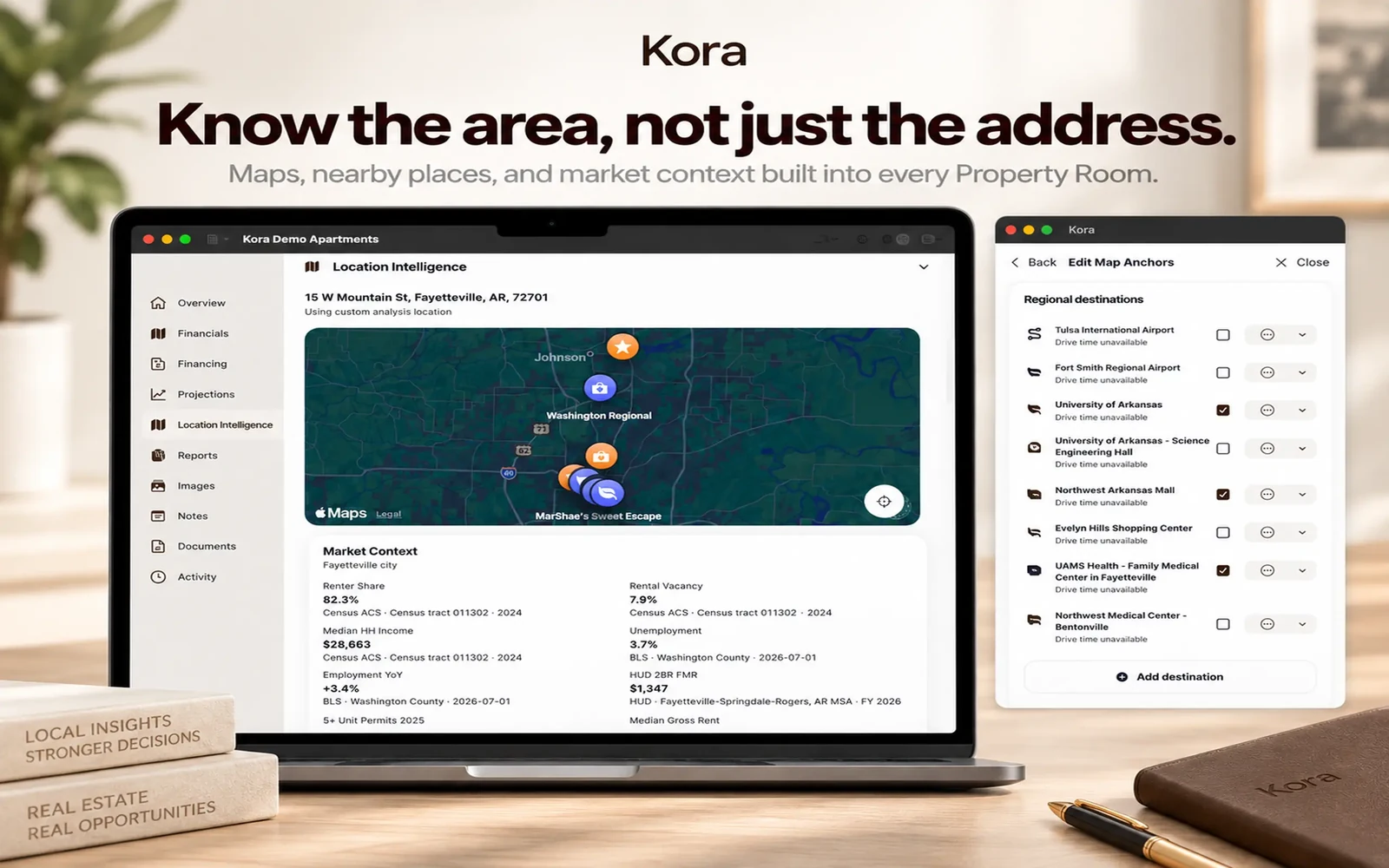
Location Intelligence adds a subject-property map, nearby places, regional destinations, selectable map categories, and available market or demographic context to a Property Room. That context can also support briefings and reports.

Available now on iPhone, iPad, and native Mac. Free download; advanced workflows require Kora Intelligence.
From information to useful work.
- 01
Start with the property
Use its address/location to place the subject on the map and explore surrounding places.
- 02
Choose what matters
Available categories include groceries, parks, universities, urgent care, pharmacies, restaurants, transit, airports, libraries, and recreation.
- 03
Keep the context attached
Bring relevant information into Kora Prep, Location Insights, and reports while retaining the source and geographic context.
Source, place, and date all matter
Depending on the metric, sources can include Census, HUD, BLS, BEA, FHFA, and Apple Maps / MapKit. Availability varies. Kora retains source, geography, and vintage distinctions instead of labeling unlike data as one precise local market.
Context, not a neighborhood verdict
Available measures can include renter share, rental vacancy, median household income, unemployment, employment change, HUD two-bedroom fair market rent, and housing or permit context. They do not justify unsupported claims about an individual property or neighborhood.
Part of the room, not another research tab
The property map and relevant context can travel into a briefing or report. Connected data needs network access; local room access and calculation are separate capabilities.
Keep the work connected.
A few useful answers
Before the next step.
Where does Kora’s location data come from?
Depending on the metric and availability, Kora can use Census, HUD, BLS, BEA, FHFA, and Apple Maps / MapKit. Source, geography, and vintage are kept distinct.
Does every property have every metric?
No. Data coverage and availability vary. A source’s geography or time period should not be represented as a more precise local fact.
Can location information appear in reports?
Yes. Available location context can support report content, maps, Location Insights, and Kora Prep.
Pricing & access
Kora Intelligence.
Your next step.
Free to download. The eight calculators, branded calculator exports, branding, and Market Pulse are free. Existing rooms and saved exports remain readable. Kora Intelligence unlocks room creation and editing, source processing, intelligence, projections, new reports, and collaboration. Room permissions still apply.
US App Store prices in USD, checked October 6, 2026. The same subscription, with two billing choices. Apple shows local pricing and purchase terms before you subscribe.
Check your device.
The current US listing requires iOS 27.0 or iPadOS 27.0, or macOS 27.0 with an Apple M1 chip or later. Check App Store compatibility for your device before downloading.
Keep the facts in view.
Financial calculations are deterministic; manual values remain authoritative. Review property facts, assumptions, and generated material before sharing. Connected services need a network; iCloud Sync is optional. Read the privacy policy.

Available now on iPhone, iPad, and native Mac. Free download; advanced workflows require Kora Intelligence.